Experiencing poor Wi-Fi signal at home? Read our Wi-Fi Extender vs Mesh Wi-Fi: How to Choose the Right Solution for Your Home
- Thomas Hoey

- Feb 17
- 4 min read
Updated: Mar 13
Reliable Wi-Fi is essential in every modern home. From streaming and video calls to gaming and smart home devices, a stable wireless connection ensures everything runs smoothly. However, many homes experience weak signals, slow speeds, or dead zones.
Two of the most common solutions to improve Wi-Fi coverage are Wi-Fi extenders and mesh Wi-Fi systems. Understanding the differences between these options will help you choose the right solution for your home.
Why You May Need to Improve Your Home Wi-Fi
Most broadband routers are designed to cover a limited area. Depending on your property size, layout, and construction materials, your Wi-Fi signal may not reach every room effectively.
Common signs of poor Wi-Fi coverage include:
Weak signal in certain rooms
Slow internet speeds away from the router
Frequent disconnections
Buffering during streaming
Poor performance on upper or lower floors
Improving your Wi-Fi coverage ensures reliable connectivity throughout your home.
What Is a Wi-Fi Extender?
A Wi-Fi extender is a device designed to improve wireless coverage by extending your existing network into areas with weak signals. Some extenders communicate wirelessly with your router, while others—known as powerline Wi-Fi extenders—use your home’s electrical wiring to carry the network signal to another location.
In a powerline setup, the primary adapter connects to your router using an Ethernet cable and is plugged into a wall socket. The secondary adapter is plugged into a wall socket in the area with poor Wi-Fi coverage, where it creates a new wireless signal. The extender works by receiving the network connection from your router, either wirelessly or through the electrical wiring, and rebroadcasting it to improve coverage and reliability in nearby areas.
Wi-Fi extenders are typically positioned between your router and the area with weak signals to provide the best possible coverage improvement.
Advantages of Wi-Fi Extenders
Lower upfront cost
Simple installation
Effective for improving signal in one specific area
Suitable for smaller homes or flats
Disadvantages of Wi-Fi Extenders
Can reduce overall network speed
May create separate Wi-Fi network names
Less reliable than mesh systems
Limited coverage improvement
Wi-Fi extenders are best suited for solving isolated coverage problems.
What Is a Mesh Wi-Fi System?
A mesh Wi-Fi system uses multiple devices, known as nodes, to create a single, seamless wireless network throughout your home. One node connects to your broadband router, while additional nodes are placed around your home to provide consistent coverage. Your devices automatically connect to the strongest node, ensuring reliable connectivity without interruptions.
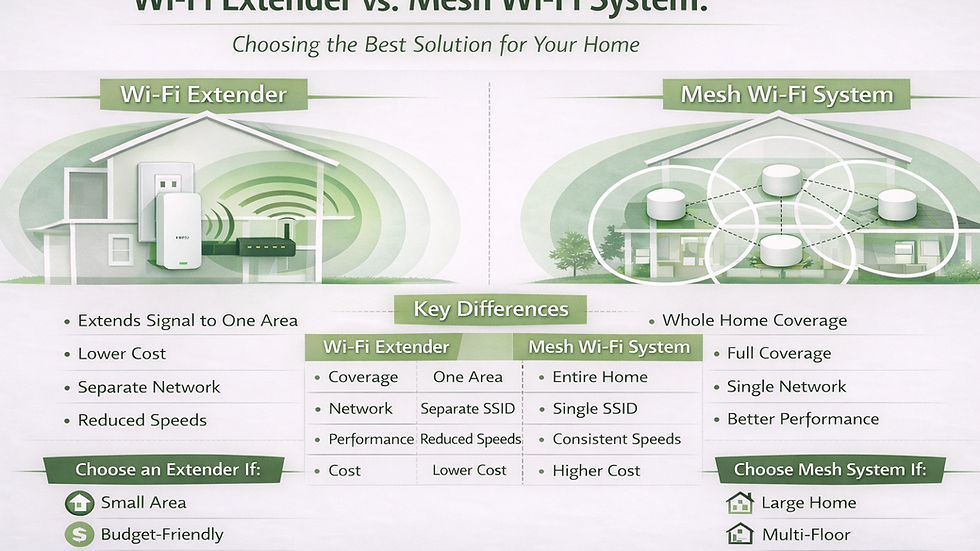
Visual Comparison: Wi-Fi Extender vs Mesh Wi-Fi System
Mesh systems create a unified network throughout your home, while extenders simply rebroadcast your existing signal into specific areas.

Advantages of Mesh Wi-Fi Systems
Provides full-home Wi-Fi coverage
Creates a single seamless network
More reliable and stable connections
Better performance across multiple rooms
Easy to expand by adding additional nodes
Disadvantages of Mesh Wi-Fi Systems
Higher upfront cost
Requires proper placement for best performance
Mesh systems are ideal for larger homes or properties with multiple floors.
Key Differences Between Wi-Fi Extenders and Mesh Systems
| Feature | Wi-Fi Extender | Mesh Wi-Fi System |
|----------------|------------------------------------|----------------------------------|
| Coverage | Improves signal in one area | Covers entire home |
| Performance | May reduce speeds | More consistent performance |
| Network | May create separate networks | Single seamless network |
| Scalability | Limited | Easily expandable |
| Reliability | Moderate | High |
| Cost | Lower upfront cost | Higher upfront cost |
Which Option Is Right for Your Home?
Choose a Wi-Fi extender if:
Your home is small or medium-sized
Only one area has weak signal
You want a lower-cost solution
Choose a mesh Wi-Fi system if:
Your home has multiple floors
You experience Wi-Fi issues throughout the property
You want reliable coverage everywhere
You have many connected devices
You want the best long-term solution
Mesh systems provide the most reliable and future-proof solution for most homes.
The Importance of Proper Installation and Placement
Even the best equipment will not perform well if installed incorrectly. Proper placement of Wi-Fi devices ensures maximum coverage and performance. Correct installation includes:
Positioning nodes or extenders in optimal locations
Avoiding interference from walls and obstacles
Ensuring proper configuration
Testing coverage throughout the home
Professional installation ensures your network performs as intended.
Home Wi-Fi Installation by Hoey Network Solutions Ltd
Hoey Network Solutions Ltd provides professional home network and Wi-Fi installation services, including mesh Wi-Fi system setup and optimisation. We ensure your equipment is correctly installed, positioned, and configured to provide reliable coverage throughout your home. Once installation is complete, your network is fully operational and ready for everyday use.
This provides a stable and reliable Wi-Fi network designed to support modern home connectivity.
Conclusion
Both Wi-Fi extenders and mesh Wi-Fi systems can improve wireless coverage, but they serve different purposes. Extenders are suitable for small coverage gaps, while mesh systems provide complete, reliable coverage throughout your home. Choosing the right solution and ensuring proper installation will provide consistent performance and improve your overall internet experience.